
If you can cut a one-piece MDF cabinet door on your CNC, you can cut wainscot and slat wall panels the same way. It is the same idea scaled up: one solid sheet, the frame and panels carved into the face, no strips to rip, no rails and stiles to assemble on site.
This week I added wall panels to DoorFORGE. Here is how the panels work, and how to get a whole room onto the sheet without doing the math by hand.
Two styles
Wainscot
A row of recessed panels with a frame left standing between them, the same look as a shaker door turned sideways. Pick a panel count for each wall and the frame widths you want, and the panel widths are solved so the room reads even from corner to corner.
Slat wall
Evenly spaced vertical slats, grooved into a solid sheet. Set the slat width and the gap. When a wall divides evenly by the spacing you get full slats at both ends, so the pattern lands centered on the wall instead of finishing with a half slat in the corner.
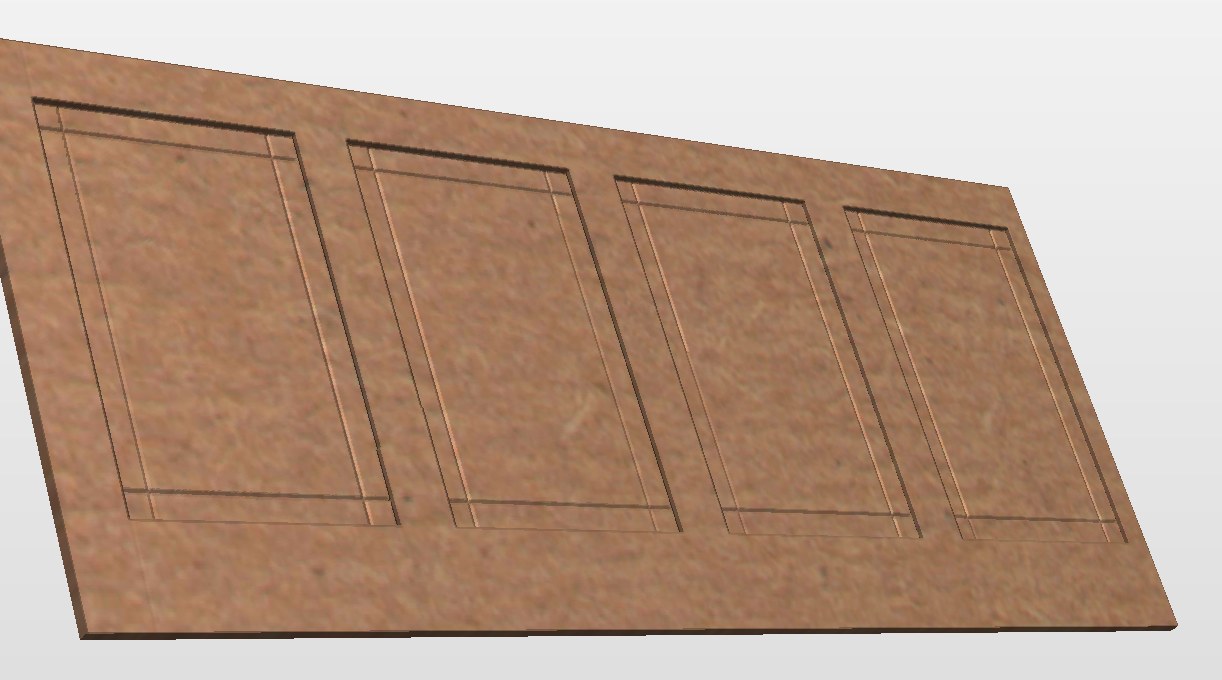
Why one-piece MDF works for walls
- Faster install. A panel goes up as a sheet. No scribing dozens of strips, no filling nail holes between every slat.
- Clean, even spacing. The CNC puts every groove where the drawing says. Nothing drifts across a 16-foot wall.
- It paints like a door. Seal the cut edges, prime, paint. Same finish schedule as your MDF doors.
- Stable. No wood movement, so panels don't open up at the seams in winter.
Same tradeoff as doors: this is a painted product. Stained wood wainscot is a different job.
Typing in a room
Here is the part that used to take an afternoon with a tape and a calculator. In DoorFORGE you enter the room one wall at a time:
- Name the wall (north, fireplace, hallway, whatever you call it on site).
- Enter its length. That's the only number you need. Add a height if that wall is different from the rest.
- Pick the style and the settings for the room: panel count or slat spacing, frame widths, height.
DoorFORGE then solves the panel widths across each wall so they come out even, splits any wall longer than a sheet at a frame line, and nests all the sections on the sheet the same way it nests doors. You get the sheet count before you buy the MDF.
Cutting it
Hit Save for VCarve, run DoorFORGE Import inside VCarve Pro, and the sections land on the sheet with the toolpaths built and in order: panel clearing and grooves first, cutout last so every section stays held down while it is being carved.
Pull the sections, label them by wall name, seal the edges, and they are ready for primer.
Things that bite on wall panels
- Seams. Put the seam between sections on a frame or in a groove, never in the middle of a flat panel. DoorFORGE splits at a panel line for this reason.
- Hold-down. A big sheet with most of its face pocketed out wants to lift. Vacuum is not optional here.
- Measure the sheet. Same as doors: set depths to the thickness you measured, not the label.
- Walls are never square. Leave a scribe allowance at outside corners and let the trim cover the inside corners.
DoorFORGE is built on top of VCarve Pro and backed by The Homestead Workshop, a woodworking shop trusted by 24,000+ followers. I run it in my own shop.
Design a room in your browser
Open the designer, switch to Wall panels, and type in your first wall.
Open the designerFrequently asked questions
Can you make wainscot panels on a CNC?
Yes. Cut each panel as one piece of 3/4 inch MDF with the frame and recessed panels carved into the face. There are no rails or stiles to assemble; the panel goes straight from the machine to primer.
Can you make slat wall panels on a CNC?
Yes. The CNC grooves the slat gaps into a solid MDF sheet, so each panel is one piece with the slats already spaced and the edges clean. It installs like a sheet, not like dozens of individual strips.
How do you size wainscot panels so they come out even across a wall?
Enter the wall length and the number of panels you want, and let the software solve the panel width so the last panel matches the first. DoorFORGE does this for the whole room at once.
What if a wall is longer than a sheet of MDF?
The wall has to be split into sections. DoorFORGE splits a long wall at a panel line so the seam lands where a frame is, then nests the sections on the sheet like doors.
Can DoorFORGE make wall panels?
Yes. Wall panels (wainscot and slat wall) are part of the DoorFORGE library. You type in each wall of the room, pick the style, and the panels are solved, drawn, nested and brought into VCarve Pro with the toolpaths built. Wall panels require a DoorFORGE license.
Do I need a vacuum table to cut MDF wall panels?
Yes. The same rule as one-piece doors: pocketing a panel can let it shift or lift without strong hold-down, so a vacuum table is required.
Does the wall panel designer work in metric?
Yes. Like the rest of DoorFORGE, it works in inches or millimeters.
New to one-piece MDF? Start with the easiest way to make MDF cabinet doors on your CNC, then come back for the walls.